See Your Money Clearly Without Connecting Your Bank
Upload your bank CSV file and get a simple AI-powered money report that explains your income, spending, recurring charges, and money leaks in plain English.
Your file is read on your own device — we never receive it. No bank login, no account, no database. See how.
New to budgeting? No finance background needed. Running a business? Your free commercial license is included. Or see a full example report first.
Why CSV
Why We Use CSV Uploads Instead of Bank Connections
Most finance apps want you to connect your bank account. That may sound easy, but it can create problems. My Money Picture keeps things simple — you upload a CSV file from your bank, and the app turns it into a clear money report.
CSV Upload vs Bank Connection
| Topic | CSV Upload | Bank Connection |
|---|---|---|
| Bank password needed | No | Often yes, through a third-party connection flow |
| Cost to app | Lower | Higher |
| Report price | Easier to keep affordable | Usually more expensive |
| Connection failures | No live connection to break | Connections can fail or disconnect |
| User control | You choose exactly what to upload | Data access depends on the provider and bank |
| Best for one-time reports | Yes | Better for ongoing tracking |
How It Works
From upload to insight in 4 steps
Download your CSV file from your bank — up to 3 years
Upload it to My Money Picture
Review your simple money preview
Unlock your full AI money report for $19.99
Your Report
What Your Report Shows
No jargon. No surprises. Just a clear picture of your money — from up to 3 years of your transactions.
Not just a summary — a plan that pays for itself
Your $19.99 report turns your numbers into clear, dollar-based steps you can act on this week.
Money Health Score
A single 0–100 score with a plain-English breakdown of your habits.
Yearly savings found
We put a dollar figure on what you could recover over the next year.
Subscription audit
Every possible subscription, totaled by month and by year.
Suggested 50/30/20 budget
A starting budget built from your real income, needs, and wants.
What-if simulator
Slide to see what trimming a category would save you.
Month-over-month trends
See which categories went up or down between months.
Top merchants
Where your money went by name, not just by category.
Downloadable PDF
Save or print a clean, branded copy of your full report.
Example Report
See a Full Report Before You Buy
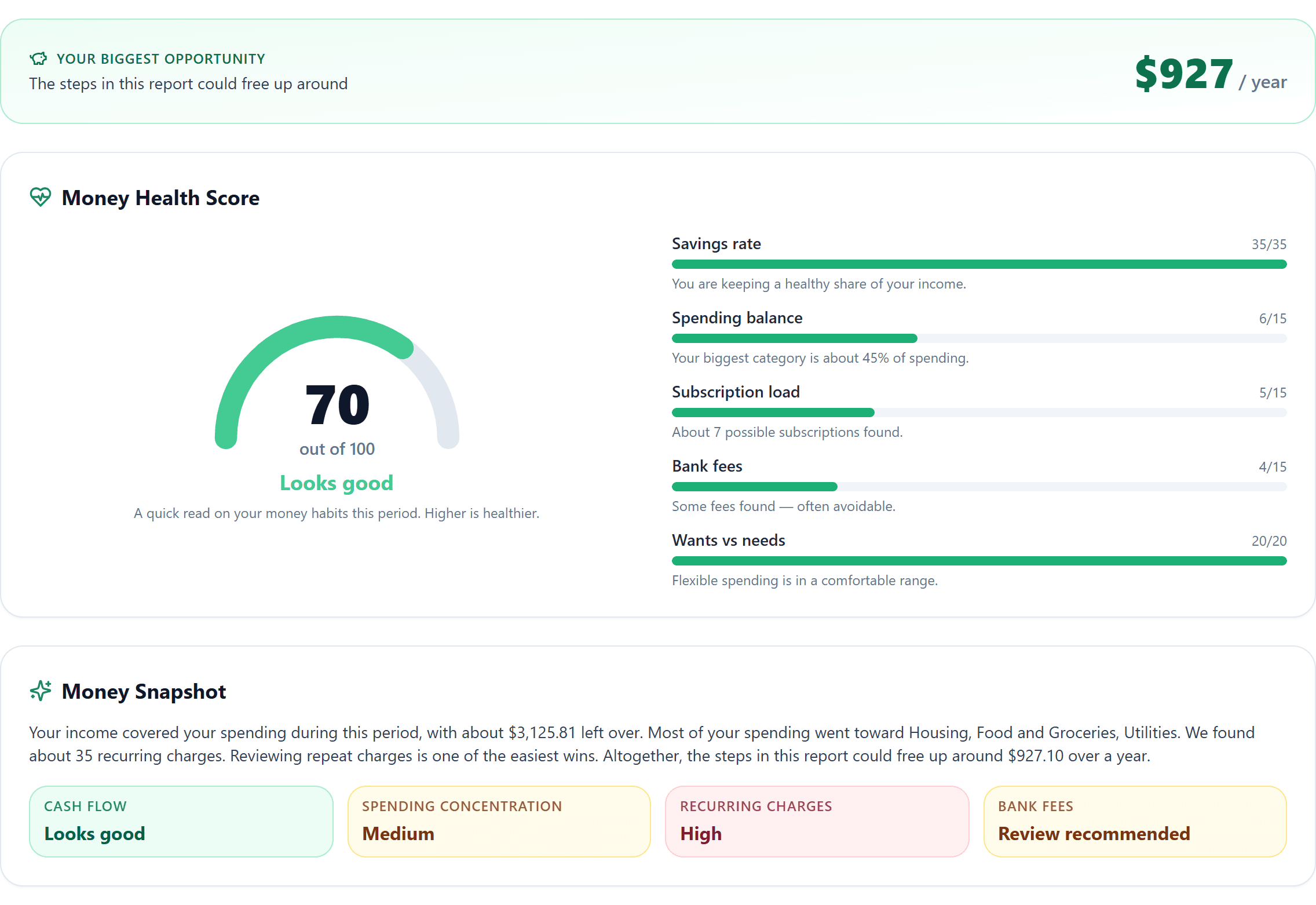
Here is the top of a complete My Money Picture report, built from example transactions. Walk through every section — and download the sample PDF — before you upload anything.
Who This Is For
Beginners and everyday people
- Complete beginners — no finance background needed
- Anyone who has never made a budget before
- People who find spreadsheets confusing or intimidating
- People who do not want to connect a bank account
- People who want a simple one-time financial checkup
- People who need a clear money picture before making changes
Solopreneurs and entrepreneurs
- Coaches and consultants who want a paid client deliverable
- Bookkeepers and tax preparers adding a money review service
- Financial educators running workshops or group programs
- Side hustlers who want a product to sell without building one
- Anyone who wants to charge for reports under the free commercial license
What This Is Not
- This is not financial advice
- This is not a bank
- This is not a credit repair service
- This does not move your money
- This does not connect to your bank
- This does not guarantee financial results
- This is a simple report that helps you understand your financial activity
You Stay in Control
My Money Picture does not ask for your bank login, and it never receives your file. Your CSV is read by your own browser and your report is built on your own device.
- Your file is never uploaded to us.
- There is no account and no database of your transactions.
- We never see your bank login, card number, or balances.
- Columns we don't need are never saved to your device.
- AI answers are off unless you switch them on.
- You can delete everything from your browser in one click.
Don't take our word for it — press F12, open the Network tab, and upload. You won't see your file sent anywhere. Read the privacy page.
Built for Everyday People
You do not need to know finance terms. You do not need to understand spreadsheets. You upload your file, and My Money Picture explains your money in plain language.
Free commercial license — sell the reports to your clients
Every report you create with My Money Picture comes with a free commercial license. You may share, deliver, or sell the reports you generate to your own clients, customers, or community — no royalties and no extra fee. For a solopreneur or entrepreneur, that turns My Money Picture into a done-for-you service you can offer from day one.
- Run a report for each client from their own CSV
- Put your own fee on it — you set the price
- Keep 100% of what you charge, with no royalties
- Deliver it as a branded PDF you can print or email
The license covers the reports you produce — not resale of the My Money Picture app or platform itself.
FAQ
Frequently Asked Questions
Do I have to connect my bank account?+
No. My Money Picture is built around file uploads. You stay in control.
What file should I upload?+
A CSV transaction export from your bank or credit card account works best.
Why is CSV better for this app?+
CSV files help keep the app simple, private, and affordable.
How much history can I upload?+
Each report covers up to 3 years of transactions. If your file reaches further back, we automatically use the most recent 3 years and tell you exactly how many older transactions were set aside — nothing in your file is changed. Most people get the clearest picture from 3 to 12 months, which is long enough to reveal recurring charges and month-over-month trends.
Can I run a report on an older period?+
Yes. Export just that date range from your bank and upload it on its own. Each upload is analysed independently, so you can run as many 3-year windows as you like.
Where does my bank data actually go?+
Nowhere. Your CSV is read by your own browser, straight from your computer, and the whole report is calculated on your device. The file is never uploaded to us. You can verify it yourself: press F12, open the Network tab, and upload your file — you will not see it sent anywhere.
Do you store my transactions on your servers?+
No. There is no account to create and no database of customer transactions. Your report is saved only in your own browser, on your own device, and you can delete it in one click.
Does the AI see my bank data?+
Only if you switch it on. AI answers are off by default, and while they are off nothing leaves your device. If you turn them on, each question sends a short summary (totals, category percentages, and merchant names) — never your transaction list, balances, or file — and your questions are not used to train any AI model.
How do I delete my data?+
Use the delete button in the site footer or on the Privacy page. It removes everything this app has stored in your browser, immediately. Download your PDF first, because a deleted report cannot be recovered without uploading again.
What if I accidentally upload my account number?+
You are covered twice over. The report only ever uses the date, description, and amount columns, so any other column is ignored and never saved to your device. And if a number is buried inside the transaction description itself, anything shaped like a card number, account or reference number, Social Security number, email address, or phone number is masked before your report is saved. Ordinary store numbers are left alone so your transactions stay recognisable.
Will this work with every bank?+
It should work with most banks that allow CSV transaction downloads. Some files may need column matching.
Is this financial advice?+
No. The report gives educational insights based on your uploaded data. It does not replace professional financial advice.
What do I get after I pay?+
You unlock the full AI money report: your Money Health Score, a suggested 50/30/20 budget, an annualized subscription audit, month-over-month trends, a what-if savings simulator, money leaks with dollar estimates, next steps, and a downloadable PDF.
Do I need finance knowledge?+
No. The app explains everything in plain language.
I have never budgeted before. Is this too advanced for me?+
No. My Money Picture is built for complete beginners. There is nothing to set up, no categories to create, and no finance terms to learn. You upload a file and read a report written in ordinary words, with the next steps spelled out for you.
Can I see what the report looks like before I pay?+
Yes. The example report page walks through every section of a complete report, built from example transactions, and you can download the sample PDF too. You also get a free preview of your own numbers before you decide to unlock the full report.
Can I sell these reports to my clients?+
Yes. Every report you create comes with a free commercial license — you can share, deliver, or sell the reports you generate to your own clients or community with no royalties or extra fee. The license covers the reports you produce, not resale of the app itself.
I am a solopreneur. Can I use this as a service for my clients?+
Yes, and that is one of the main reasons people buy it. Coaches, bookkeepers, consultants, and financial educators run a report from each client's CSV, add their own fee, and deliver the branded PDF. You set the price and keep everything you charge.
Can I get a refund?+
Because your report unlocks and is available to download the moment you pay, purchases are final and non-refundable. If something goes wrong on our end — the report didn't unlock, or you hit a technical problem — contact us and we'll make it right.
Ready to see your money picture?
Upload a CSV file from your bank, or look through a full example report first. Your free preview is ready in seconds.